Open your Mac's storage settings and you'll probably see a big grey bar called System Data. Click on it and you won't learn much. It's the one category Apple doesn't explain.
Diskzy is the app I built to explain it. I shipped version 0.1.0 on October 9, 2026, and 0.2.0 on November 1.
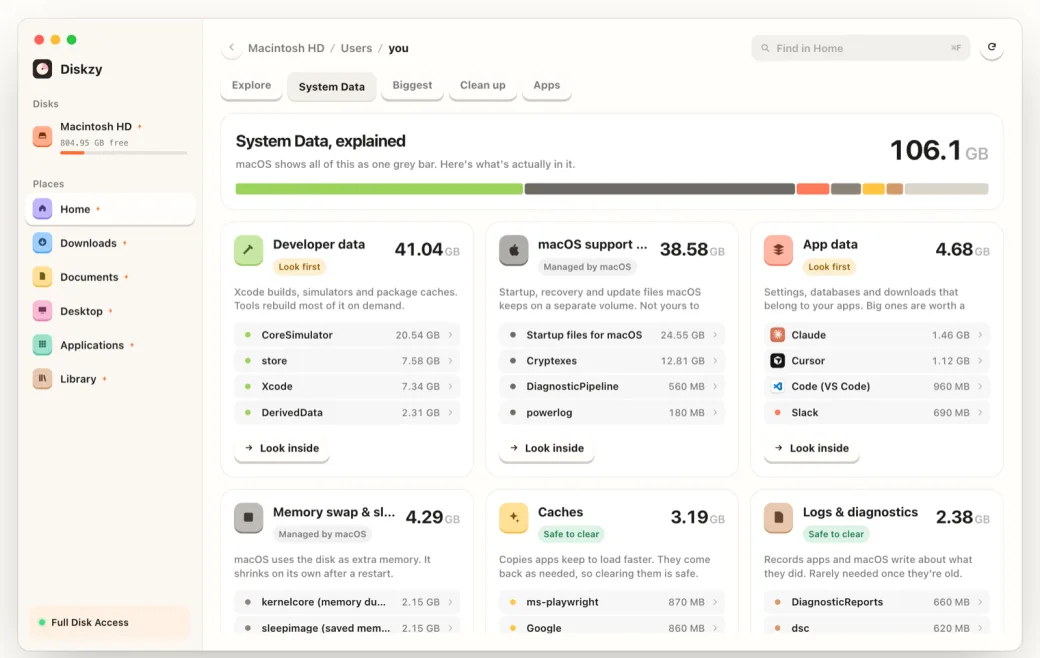
System Data is a remainder
The first surprise was that System Data isn't really a thing. It isn't a folder, and there's no list to read.
macOS adds up what it knows how to label, like apps, documents and photos. Whatever is left lands in the grey bar. So the only way to explain it is to read the entire disk yourself and sort what you find.
- Developer data 41.04 GB
- macOS support files 38.58 GB
- App data 4.68 GB
- Memory swap 4.29 GB
- Caches 3.19 GB
- Logs 2.38 GB
My first scan was almost double
My first full scan reported nearly twice the space actually in use.
Since Catalina, your files live on a separate data volume, and macOS uses firmlinks to make parts of it appear under /. My scanner was reaching every one of your files by two different routes.
/Users/you- the same folder counted twice
/System/Volumes/Data/Users/you- the same folder counted twice
The categories had a similar trap. iPhone backups sit inside Application Support. Hugging Face models sit inside ~/.cache. If you add up each group, you explain more space than the disk is using.
So each folder only keeps what's left after subtracting the nearest named folder inside it.
~/Library/Application Supportits total, minus backups
iPhone backupscounted here, once
And some of it can't be seen at all. Local snapshots hold on to space that no file listing can show. So the app ends with one honest row for the gap, called "Not visible to apps". I'd rather say I don't know than round it away.
The real product is trust
Scanning was hard, but it wasn't the hard part. You're asking someone to let an app delete files from their computer, and cleaner apps have earned their bad reputation.
So nearly every product decision comes from the same place:
- Everything goes to the Trash. Nothing is deleted outright.
- Nothing leaves your Mac.
- Rows only start ticked when it's safe, and the ones left out say why.
- It's a one-time price, with a 30-day refund.
- Only installers that have sat loose in Downloads for two weeks start ticked. One on your Desktop might be there on purpose.
I also changed who starts the clock. The 72-hour trial begins at your first finished scan, so time spent before you've seen a result doesn't count against you. And the paywall leads with your own Mac's number rather than a generic pitch.
There's a small one I like too. The website has a testimonials section that stays hidden until it has real ones.
Moving quickly in public
The version history is what building this has looked like so far.
The Worktrees tab is the one I find funniest. Coding agents leave git worktrees behind in hidden folders, and they can take up a lot of space. Diskzy finds them, locks the ones with unsaved changes, and only starts ticking a merged, clean one after 3 quiet days, so it won't pull one out from under an agent that's still working in it.
That's a problem that didn't exist for most people a short while ago.
If you've got a big grey bar, have a look and let me know what was in it.